Managing Your Profile
Keep your email, phone, and (if you're a creator) bank details current so you don't miss notifications or delay payouts.
Use My Profile to keep your PayBru account details current. This helps with support, account recovery, notifications, payments, and payouts.
Open My Profile
- Sign in to PayBru.
- Open the Client Portal.
- Go to Resources > My Profile.
The page title is Profile Settings.
Update Profile Details
Open the Profile tab to update:
- Profile photo
- Display name
- Email address
- First name
- Last name
- Phone number
The profile strength area shows which details are complete and which ones still need attention.
Select Save Changes after updating your details.
Manage Security
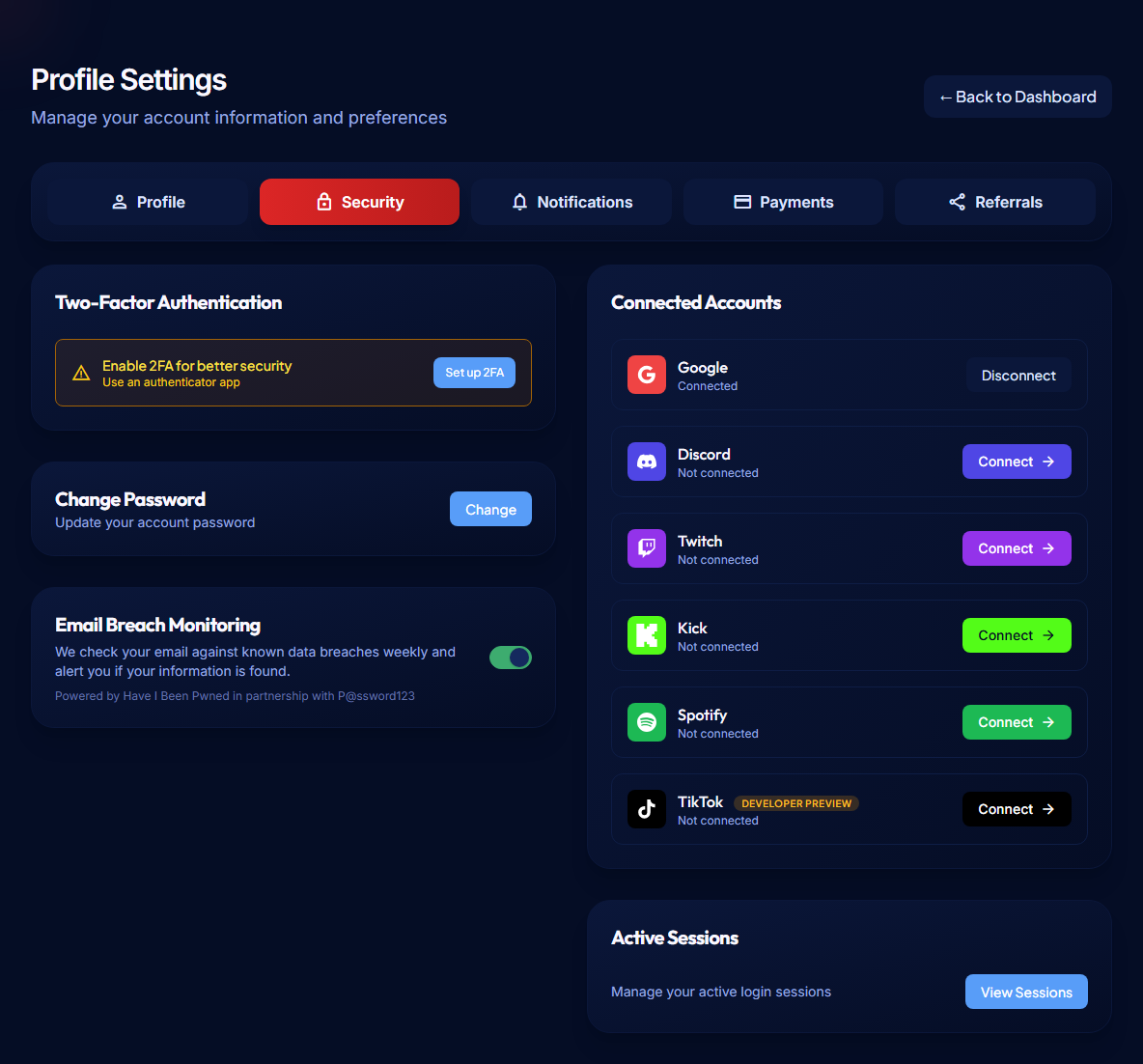
Open the Security tab when you need to protect or recover your account.
You can:
- Enable or manage Two-Factor Authentication
- Download or regenerate recovery codes
- Change your password or set a password if you use social login
- Connect or disconnect accounts such as Google, Discord, Twitch, Kick, Spotify, and TikTok
- Review active sessions
- Revoke other active sessions
Connected account providers


If you manage a community or receive payouts, enable two-factor authentication or connect a trusted social login for stronger account security.
Set Notification Preferences
Open the Notifications tab to control how PayBru contacts you.
Notification channels include:
- In-app notifications
- Email notifications
- Discord notifications
Keep important payment, membership, payout, and support notifications enabled so you do not miss account activity.
Manage Payment Details
Open the Payments tab to review payment and bank details connected to your account.
Members use this area to manage saved payment information. Creators use this area to add the South African bank account used for payouts.
Double-check bank account details before saving them. Incorrect account numbers or branch codes can delay creator payouts.
Use Referrals
Open the Referrals tab to find your referral code or link.
Creators can share referral links with other creators. Eligible referrals may reduce the PayBru platform fee for a period once the referral requirement is met.
When to Update Your Profile
Update your profile when:
- Your email address or phone number changes.
- You want to connect Discord for community access or notifications.
- You are preparing to receive payouts.
- You need to update bank details before requesting a payout.
- You want to strengthen account security.
- Support asks you to confirm profile or account information.