Managing Payments
PayBru already sends day 1, 3, and 5 reminders during the 6-day grace period — your role is to spot the recoverable ones and reach out.
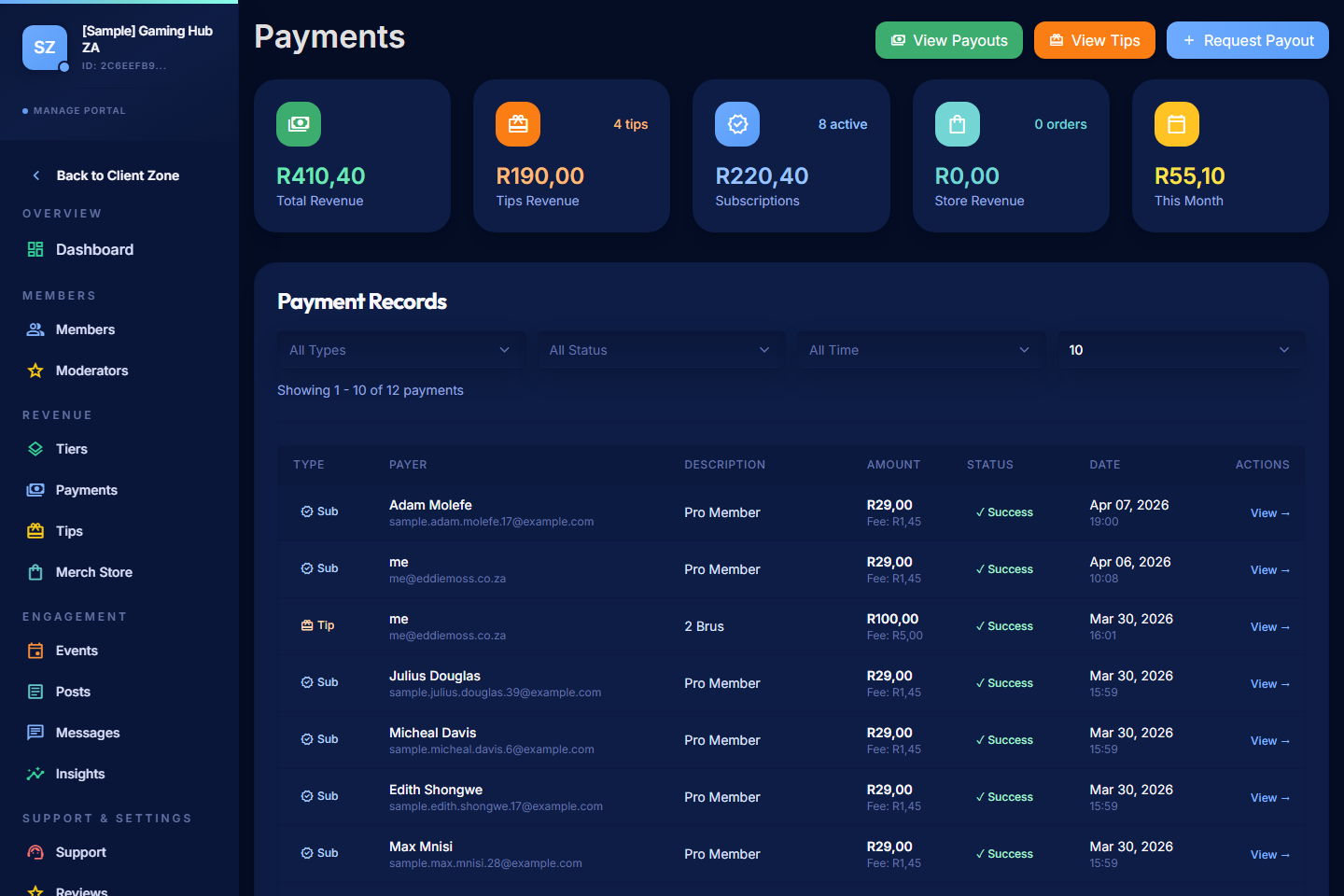
Use the Payments area in the Manage Portal to track every charge that hits your community and intervene on payments that need attention.
Open Payments
- Open the Manage Portal.
- Select Revenue > Payments.
Read the Summary Cards
The cards along the top show key signals at a glance:
- Total revenue for the period.
- Active paying members versus total members.
- At-risk members — those whose latest renewal has failed.
- Recent payment totals — useful for sanity-checking against your expectations.
Check At-Risk Members
A Past Due member's renewal has failed but they still have access during the 6-day grace period. After day 6, they move to Ended and lose access.
- Open the Past Due list, or filter the payments view by status.
- Open a member to see the failed charge details, the reason returned by Paystack, and the day they entered the grace period.
- Decide whether to:
- Reach out via Messages — a friendly nudge often recovers the payment.
- Wait — PayBru already sends the member reminders on day 1, day 3, and day 5 by email and in-app notification.
- Manually adjust the member's access if you want to extend it for a specific case (see Managing Member Access).
PayBru does not silently retry a failed renewal — the member needs to update their card and trigger a retry themselves.
Filter Payment Records
The payment list supports filtering and sorting:
- By status — Pending, Success, Failed, Past Due, or Refunded.
- By date range — useful for a quick monthly check.
- By member — track the full payment history of one person.
- By payment type — subscription renewal, tip, store order, gift, refund.
Open a payment record to see the gross amount, platform-fee deduction, gateway-fee deduction, net amount credited to your balance, and the linked member.
Use the Header Actions
- Export — download payment data for your own bookkeeping or accountant.
- Refresh — update the list with the latest payment activity.
- View Payouts — jump to the payout area to see what's available and request a payout.
Where Earnings Live
Successful payments flow into your Pending balance first, then move to Available balance after the standard hold period. See Creator Earnings Visibility for how the buckets work and Payout Overview for the payout flow.
Refunds
If a member opens a refund request, it appears in Support and the payment record shows the linked refund. Approved refunds reduce your balance for the refunded amount. See Support and Refunds.